cat articles/rtx5090x2-pc
Building a Machine Learning PC with Two RTX 5090 GPUs
I like training small Transformer models, usually around 100M parameters or less, and I run training jobs often. I have built and used custom PCs with RTX 3090, 4090, and 5090 GPUs.
This time I wanted a little more training speed and also wanted to gain practical knowledge about multi-GPU training, so I built a custom PC with two RTX 5090 GPUs. Recently, NVLink has been removed from consumer GPUs, and power consumption has also increased. There are surprisingly few examples of systems using two RTX 5090s, so I had to research more than expected. This article summarizes the build. The example reflects the situation around the end of 2025.
Power
The first difficult point with two RTX 5090s is power. The RTX 5090 has a maximum TBP of 575 W, and there are two of them. Considering the CPU and everything else, I wanted at least a 1600 W power supply. However, household 100 V outlets in Japan are limited to 1500 W, and from what I could find, ordinary PC power supplies sold for 100 V top out at 1300 W.
There are many 1300 W power supplies, but options above that become extremely limited. Higher-wattage power supplies also use a C19 input connector instead of the common C13 connector. By supplying 200 V power to that connector, output above 1300 W becomes possible.
I therefore had electrical work done to install a NEMA 20 A 250 V wall outlet, choosing Panasonic WF2520B, and made 200 V 20 A, up to 4000 W, available. The power cable needs to be NEMA L6-20P to IEC 60320 C19, so I used a Schneider Electric AP8753J Power Cord, Locking C19 to L6-20P. This outlet is also fed directly from its own breaker.
For the power supply, I chose the 1650 W ASRock Taichi TC-1650T, which seemed to have a good reputation. It supports ATX 3.1, which is relevant for the safety of the 12V-2x6 connectors that supply large amounts of power to the GPUs. This power supply also comes with a cable that can plug into a 100 V C19-C20 power cable. That only supports up to 1300 W, but because this type of cable is hard to find on the market, it is useful for test booting.
Update: Another possible method is to use a case that can install two power supplies and connect two 1300 W units to separate 100 V outlets.GPU
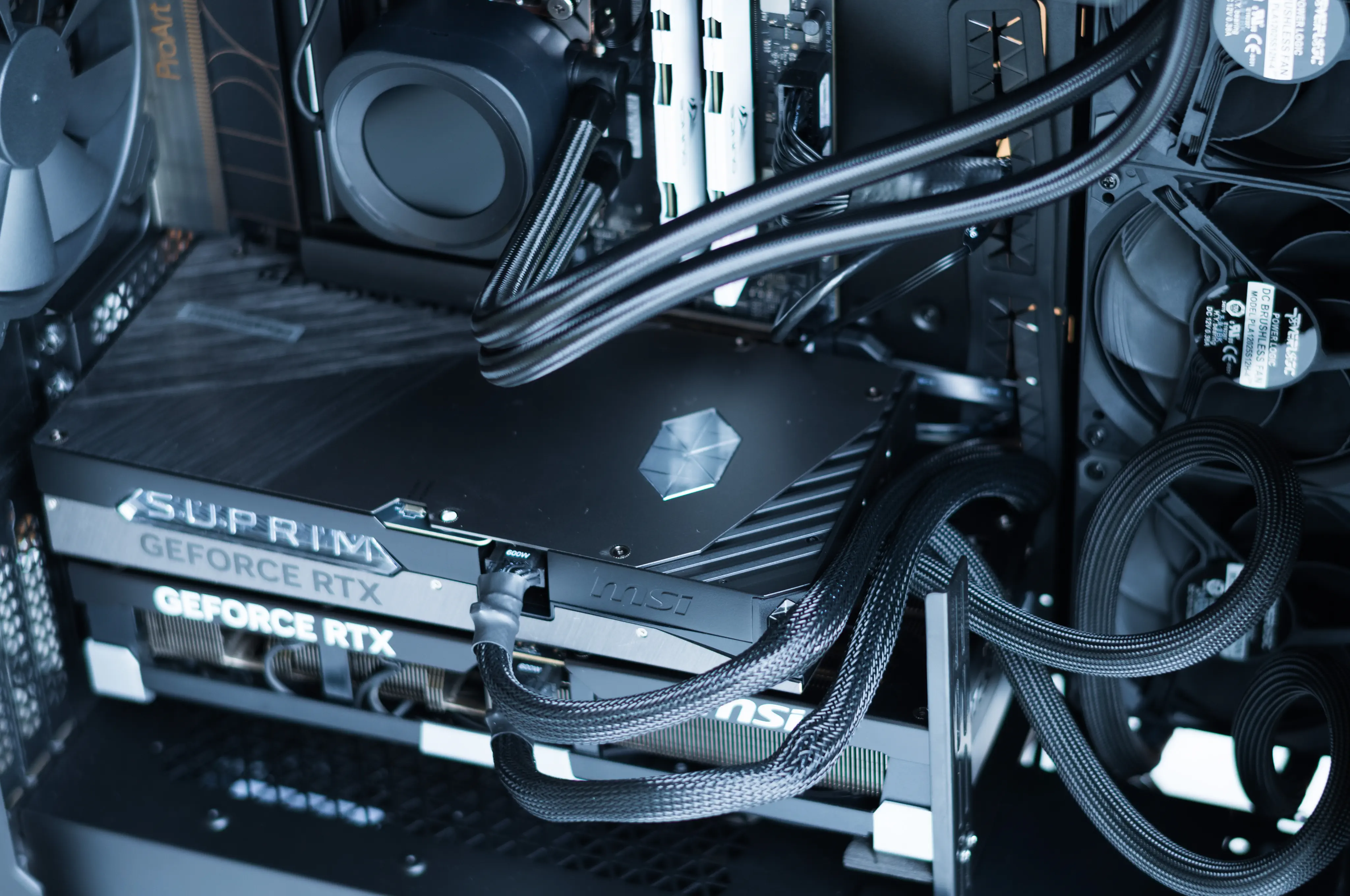
Because the RTX 5090 produces a lot of heat, most air-cooled models are three to four PCI slots thick. When using two GPUs of that thickness, you often need riser cables to physically separate them. Otherwise they may collide with the case or motherboard and fail to fit.
The main options are:
- Use air-cooled models that are three slots or thinner, though the lack of spacing may make heat a concern
- Use liquid-cooled AIO models for both GPUs
- Use one air-cooled GPU and one AIO liquid-cooled GPU
- Use riser cables somehow
I already had an RTX 5090 that was about 3.5 slots thick, so I used one AIO liquid-cooled GPU and one air-cooled GPU. If I had not already owned an RTX 5090, I probably would have used two AIO liquid-cooled GPUs and an air-cooled CPU. That would cost a little more, but it would make internal case layout easier and likely lower GPU temperatures further.
The GPUs I used are:
- MSI GeForce RTX 5090 32G VENTUS 3X OC
- Air-cooled, about 3.5 slots thick, which I already owned
- MSI GeForce RTX 5090 32G SUPRIM LIQUID SOC
- Slightly over two slots thick, with a 120 x 360 liquid-cooling radiator
If budget allows, another option is RTX 6000 Pro, which uses the same Blackwell architecture as the RTX 5090 and has 96 GB of memory. The RTX PRO 6000 Blackwell Max-Q is also an option. Its performance is somewhat lower, but power consumption is much lower at 300 W. The Max-Q model should also reduce cooling concerns and make installation easier.
Motherboard
The motherboard requirements were that it could run two GPUs at PCIe 5.0 x8, and that there was enough spacing between GPU 1, the liquid-cooled card in the upper slot, and GPU 2, the air-cooled card in the lower slot. I chose the ASUS ProArt X870E-CREATOR WiFi AMD AM5 X870E ATX, partly because I found examples of it being sold overseas in prebuilt RTX 5090 x2 PCs.
It has an onboard Wi-Fi 7 chip, but there does not currently seem to be a Linux kernel driver for it. If you plan to connect with onboard Wi-Fi, that may matter. In my use case I do not use wireless and connect over wired LAN, so it has not been a problem.
Case
I needed a case that would leave a reasonable amount of space when a 3.5-slot-thick GPU was installed in the lower slot, and that could install two AIO radiators, one for the CPU and one for GPU 1. I chose the CORSAIR 7000D AIRFLOW. It is larger than a normal case, but the larger internal space is a clear cooling advantage. I did not need a glass side panel to see inside the PC, but after building it I found it looked good and I am satisfied with it.
Airflow
When the system can consume up to around 1650 W inside the case, the generated heat is substantial. Air must circulate in a reasonable way.
Because the CPU and GPU 1 use AIO liquid cooling and GPU 2 uses air cooling, I needed to think about how to bring in and exhaust air. PC cooling fans can be switched between intake and exhaust by flipping them around. After discussing options with AI, I used the airflow below. I am not an airflow expert, so there may be a better layout.
- Front intake
- Two 140 mm fans included with the case; ideally I should add one more 140 mm fan
- Positioned to hit GPU 2, the air-cooled GPU
- Side intake
- GPU 1 liquid cooler, 120 mm x 3
- Top exhaust
- CPU liquid cooler, 120 mm x 3
- Rear exhaust
- One 140 mm fan included with the case
This was the part where I had the hardest time finding information. The remaining parts are mostly a matter of preference, but I will describe them with comments from the perspective of a machine learning PC.
CPU
I used the AMD Ryzen 9 9950X, with 16 cores and 32 threads. The 9950X3D was also available, but since I do not use this machine for games, the performance difference seemed marginal, and the 9950X was about 20,000 yen cheaper. Data processing is often parallel, so more CPU cores are useful, but going beyond this would mean Threadripper. I chose 16 cores.
RAM
I considered installing the maximum 192 GB, but due to the rapid increase in memory demand from AI-related data centers, prices were staying about four to five times higher than in September 2025. That was too expensive, so I used DDR5-5600 32 GB x 2, for 64 GB. I wanted ECC, but that was also too expensive. In my use case, 64 GB occasionally touches swap, but because the swap is on a fast NVMe drive, it rarely causes real problems. More RAM would be nice, but 64 GB has mostly been enough.
This time I bought DDR5 5600 MHz 32 GB x 2 from a Chinese brand called Acclamator, which was selling for about 60% of the price of other brands with the same capacity. It seems the price has gone up since then. I ran memtest86 and stresstest-cli at 5600 MHz for about 12 hours and saw no errors. I do not yet know about long-term durability or summer heat, since it is currently winter and cold. RAM speed has almost no effect during GPU training, so I lowered it to 4800 MHz for stability. There are cases where RAM speed matters, such as CPU offload during inference, but I do not plan to use it that way.
Storage: NVMe
Training data can involve random access if handled casually, because the data is often shuffled. For example, Hugging Face Transformers shuffles data by default during training. For that reason, a large NVMe SSD is useful. More capacity is better.
- Sandisk SN850X NVMe SSD WDS800T2X0E 8TB
- CPU-connected PCIe lanes. Even 8 TB is not enough, and I use it while deleting data, so I would like more capacity.
- Samsung 980 Pro 2TB
- Added because I had one spare
- Chipset-shared lanes
Storage: HDD
I use a 14 TB HDD as a temporary location for raw downloaded data. It is too slow for workloads with random access, but it works for this purpose. In practice, the Hugging Face datasets library first downloads data to the directory specified by HF_HUB_CACHE, but when the library loads it, Parquet files are converted to Arrow format. As long as the latter can be accessed from NVMe, I can set only HF_HUB_CACHE to the HDD and separate the roles.
- TOSHIBA MG07ACA14TE 14TB
CPU Cooler
I did not have a strong preference as long as it was a 120 x 3 radiator AIO, so I used the CORSAIR NAUTILUS 360 RS LCD. I bought it because the LCD on the CPU cooler could display CPU temperature, which seemed nice. After buying it, I realized the display is controlled over USB, making it difficult to control from Linux. There are OSS options, but showing temperature quickly did not seem straightforward. If I were buying now, I would probably choose a model without the LCD.
Assembly
Other than the case, power supply, and air-cooled GPU being heavy enough to cause muscle soreness, and my own repeated mistakes with fan orientation and radiator orientation, the build was straightforward. It booted on the first try and has been running without problems.
OS
I used Ubuntu Server 24 LTS, which I am used to. I only connect over SSH and do not use a GUI at all.
Impressions After Building an RTX 5090 x2 PC
It has been about a month since I built it. Perhaps because it is winter, even when both GPUs are fully used, it has been stable without particular problems. One good point is that when PCIe is not the bottleneck, for example when training a bi-encoder model with MLM, training speed is about 1.8 times faster than with one RTX 5090. Inference is also convenient when horizontal processing is possible. For example, processing 10 million records with Qwen3-8B on vLLM can run at almost twice the speed.
CUDA makes it easy to switch which GPU a program can see with the CUDA_VISIBLE_DEVICES environment variable. If I want to use GPU 2, I can set CUDA_VISIBLE_DEVICES=1, and the program recognizes it as a single GPU without any code changes. This makes it easy to switch between GPUs.
It has also been useful for learning about multi-GPU systems. Until now I had only used one GPU, so I was able to learn methods and ways of thinking about training and inference in a multi-GPU environment.
On the other hand, PCIe 5.0 x8 speed often feels like a bottleneck. For example, PyTorch DDP performs All-Reduce to synchronize data between GPUs at every training step, and depending on the training method that can take a long time. Large-batch contrastive learning is one example. GPU SM idle time can increase substantially, and the speedup may be only around 1.2x. In some cases one GPU can even be faster.
With datacenter GPUs such as B200 and H200, NVLink can provide hundreds of GB/s to TB/s between GPUs depending on the configuration. PCIe 5.0 x8 has an effective speed of about 20-30 GB/s, so it is much slower than NVLink. Expensive GPUs are well designed for a reason. A machine with eight B200s might cost around 80 million yen.
Overall, I am very satisfied with the build. The timing of buying parts was also relatively good. Memory was already expensive, but by mid-January 2026, storage, memory, and RTX 5090 GPUs had become even more expensive. AI demand and the weak yen have made many things costly.